- Published on
AI policy template: what can staff use, share and approve?
- Authors

- Name
- Almaz Khalilov
Allow named useful tasks with approved data. Require source checking, appropriate review and a clear decision before expanding the use. Forbid credential exposure, access bypasses and actions outside the assistant's authority. Back predictable restrictions with technical controls and give staff a workable alternative when a task is outside scope.
A local deployment still needs rules about users, information and consequences. The location of the model does not explain whether a staff member may upload a customer record or rely on a generated instruction.
How do we adapt this AI policy template for staff?
Start with the editable AI policy template, then agree the named tools, information and reviewers before issuing it. It is an operational starting point to adapt, rather than a determination of legal compliance.
The template contains a short staff-facing policy, an approved-use register and onboarding exercises. Keep the register beside the assistant so staff can check a specific task. The local support-manual example below is deliberately narrow; the template also shows how hosted and hybrid cases need separate approval.
| Example deployment | Proposed permitted use | Decision needed before use |
|---|---|---|
| Local assistant with approved manuals | Find passages and draft an internal checklist | Confirm source rights, access, logging and actual processing boundary |
| Hosted assistant with public material | Restructure an approved public product description | Approve provider handling and check the draft before release |
| Hybrid workflow with locally redacted text | Send a reviewed, minimised excerpt to an approved hosted model | Assess residual identifying details and approve external processing; automated redaction alone is insufficient |
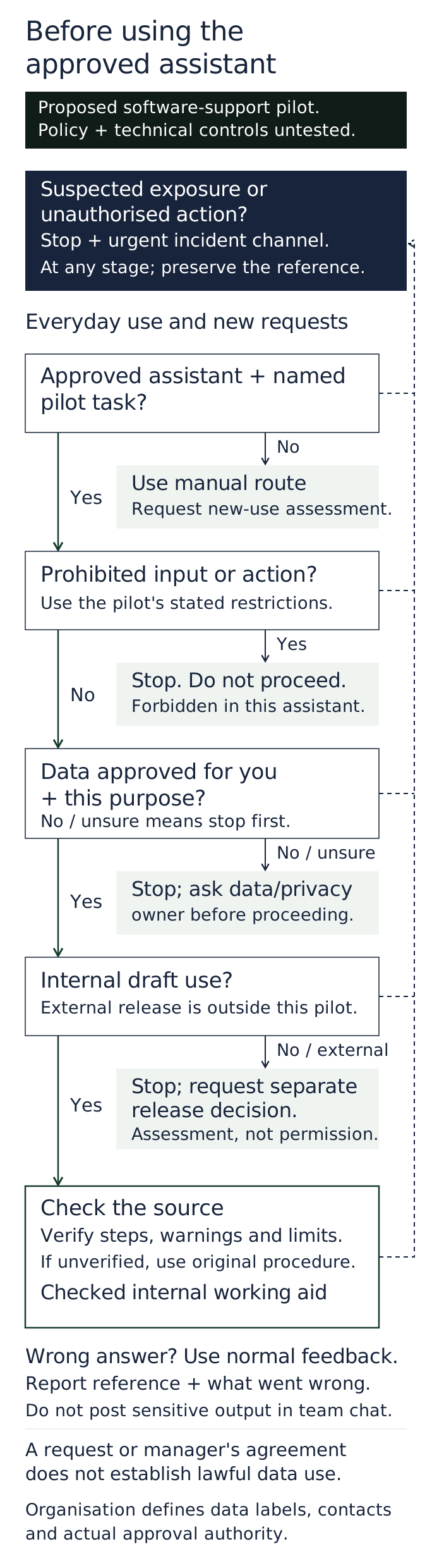
Give staff a short check: approved tool, approved task, permitted data, source check, release decision. If any answer is unclear, use the existing manual workflow and ask the named owner. Put urgent security/privacy reports on a separate route from ordinary feedback.
When someone leaves, the identity owner removes their access and the records owner handles retained conversations and files. When an integration or model changes, the policy owner checks whether the approved-use entry and training still describe the real workflow.
What should the policy let staff do?
Permit specific tasks people need to complete, using a named assistant and approved sources. Staff should be able to recognise an allowed case without interpreting a general statement about responsible AI.
Consider a hypothetical software-support team starting with one approved product-manual collection. Its assistant helps staff find passages and prepare internal draft checklists. It cannot contact customers, change service records or access personnel files.
The following decisions are proposed for that pilot:
| Staff situation | Pilot rule | What happens next |
|---|---|---|
| Find a passage in the approved manual or reorganise its steps into an internal draft | Allow, within the user's existing access | Open the source and check the draft before use |
| Upload a customer ticket, add a new collection or prepare material for external release | Stop and request a separate use-case decision | Data/privacy and workflow owners assess the proposal; use the existing manual route meanwhile |
| Paste passwords or keys, seek another user's records, bypass controls or send/change records automatically | Forbid in this assistant | Stop; report accidental exposure or a control failure through the incident route |
Employment, credit, clinical and other consequential decisions are outside this initial pilot. A manager's enthusiasm does not add them to scope. They need a separate assessment and appropriately qualified decision-makers.
The National AI Centre's policy guide calls for clear permitted uses, data rules, higher-risk approvals, oversight, reporting and review. Its template is a starting point to adapt to the organisation.
How should staff decide which information is allowed?
Point them to the organisation's actual classifications and approved collections. Access to a file in another system does not automatically approve copying it into the assistant.
For this pilot, the published product guide and specifically approved internal procedures are allowed. Customer tickets, employee notes and contract-restricted material require a separate decision. Credentials are prohibited. Label these examples beside the assistant, with a working data-owner contact for uncertainty.
For covered organisations, privacy duties apply to personal information in AI inputs and outputs. OAIC's AI-product guidance explains that even incorrect generated information about an identifiable person can be personal information.
APP 6 generally restricts secondary use or disclosure unless an exception applies. Actual applicability, purpose and other obligations need assessment. A staff policy, manager's approval or local hosting does not establish lawful handling of a particular record.
Minimise the information needed for an approved task. Removing a name is not a reason to assume that a distinctive ticket or employee account is safe to reuse.
What does a useful human check involve?
Make the check specific to what the output will be used for. For the manual-summary pilot, the user opens the source and verifies important steps, warnings and limits before using the draft.
A fluent summary might omit a prerequisite or turn “may” into “will”. Staff need time and source access to find that error. If they cannot verify a material statement, they should use the original procedure or ask the workflow owner.
For a separately approved external communication, name the competent reviewer and release authority. They should check facts, commitments, confidential details and the proposed recipient. A quick glance or an unqualified signature does not establish that the review was adequate.
Where an output might influence a person's employment, finances, health or rights, ordinary drafting permission is insufficient. Define the specialist assessment, accountable human judgement and any challenge route before considering that use. The pilot described here permits none of those decisions.
Must every AI-assisted document carry a label?
Set disclosure rules for the context and impact, while checking applicable obligations. Avoid telling staff that one label or one exemption covers every use.
The National AI Centre's disclosure guide considers the content's impact and how much AI contributed. It recommends clearer disclosure where content could affect rights, safety, trust or decisions.
Give staff concrete instructions for approved workflows. An internal working draft could identify itself as an unchecked AI-assisted draft for its reviewer. External release needs the agreed review and disclosure decision. Privacy notices, contractual requirements and sector rules may require more than a document label; the responsible specialist should assess those separately.
Which restrictions should the system enforce?
Enforce the restrictions that can be checked technically, then teach the judgements that remain. In this proposed pilot, authenticate users, restrict retrieval to approved sources and preserve access boundaries.
Keep outputs as drafts. Remove sending, publishing and record-changing tools. Restrict unapproved uploads, connections and plugins, and make the allowed task visible at the point of use. Test the effective data flow, including logging and any external features, before describing the assistant as fully local.
A warning beside a chat box is not evidence that a prohibited document cannot enter an index. Likewise, the model's refusal is not a tested permission boundary. The service owner needs implementation checks for the actual system.
How should staff report errors and suspected exposure?
Provide a normal feedback route and a clearly different urgent incident route. Put the actual contacts and reporting controls in the issued guidance and test that somebody receives the reports.
For a wrong or unsupported answer, staff should record the conversation reference, expected result and a short description. The service owner should triage recurring problems and revise the task or guidance where needed.
For unexpected access to another person's information, a credential disclosure or an unauthorised action, stop the task and use the security/privacy incident channel. Preserve the reference and follow the response owner's instructions. Avoid forwarding sensitive output through general team chat.
OAIC's breach-response guide describes containment, assessment, notification if required and review. Staff report a suspicion; the responsible incident team assesses obligations. A suspected error does not automatically establish a legally notifiable breach.
Would a shorter policy and fewer bans work better?
They may, if staff retain clear boundaries and a safe way to complete useful work. A long document that nobody can apply is a poor substitute for a usable approved workflow.
The strongest countercase to restrictive policy is hidden workarounds. If legitimate tasks are blocked and requests go nowhere, staff may seek another route. That is a risk to investigate, rather than a measured outcome for this team.
Offer a sanctioned narrow use, the existing manual alternative and a visible path to propose an improvement. Make questions and early mistake reports useful inputs to the design. The National AI Centre's team activity encourages real-task learning, simple boundaries, open discussion and regular check-ins.
Keep the staff-facing core short. Put detailed configuration, legal assessment and incident procedures in supporting records, with links from the relevant task instructions.
What should onboarding and a small pilot prove?
They should show that intended users can recognise the boundaries and follow the review and reporting routes in practice.
Use one team, the approved manual collection and synthetic examples. Ask staff to sort an allowed manual, a customer ticket and a credential example; check a deliberately flawed draft; and practise reporting a simulated exposure. Use authorised test accounts to exercise source permissions without attempting a bypass.
The team lead owns staff comprehension, the data owner approves the material, and the service/security owners verify the controls and incident route. The business owner accepts the limited workflow. Require users to handle the critical cases correctly before granting the relevant access; the exact exercises are proposed, not validated training.
If a boundary or reporting route fails, pause the affected use, correct the control or instruction and return staff to the existing manual process.
Who keeps the policy useful as the assistant changes?
Assign a policy owner and a review process that includes the people using it. Revisit the rules when tasks, sources, permissions, models, integrations or applicable obligations change, and when reports reveal a problem.
Budget for control work, staff and trainer time, output review, incident handling and updates as well as writing the document. Those costs and any benefit remain unmeasured here.
Before rollout, a staff member should be able to identify the approved task and data, required check, release boundary and correct help channel. If they cannot, simplify the workflow or guidance and try again.