What is the best hardware for a local LLM in a small team?
Choose local LLM hardware using a workload and memory worksheet. Compare context, overlapping requests, output quality and measured waiting before buying.
All postsA small team needs hardware that fits its chosen model and working context while serving the requests that actually overlap. Begin with available equipment and a bounded trial unless those requirements are already established. A purchase should follow evidence of useful answers and a specific capacity constraint.
How do we choose the best hardware for a local LLM without a generic shopping list?
Choose the configuration that meets an agreed workload with acceptable quality, waiting and operating effort. The best hardware for a local LLM depends on the model, context and overlapping requests; a single-user demonstration cannot size a shared service.
Use the editable local LLM hardware sizing worksheet before requesting quotes. It keeps host RAM and accelerator memory separate and includes a place for measured results.
| Situation | Candidate to evaluate first | What would change the decision? |
|---|---|---|
| Occasional short tasks with flexible waiting | Available supported workstation | Poor task quality, disruptive resource use or unacceptable waiting |
| Shared interactive work with overlapping requests | Dedicated candidate sized for the chosen served configuration | Failed concurrency/latency target or no dependable operating owner |
| Large context or several resident models | Configuration with enough measured memory capacity and reserve | Shorter context, fewer resident models or narrower scope still meets the task |
| Infrequent demand and no local service owner | Approved hosted or manual alternative | Data handling, availability or cost makes that alternative unsuitable |
For an estimate, separate resident weights + active context/cache + runtime buffers + other resident work + reserve. Assign each item to the memory pool that actually holds it. This is a planning checklist, not a formula for converting download size directly into a hardware specification.
A question such as “Is 6 GB VRAM enough?” needs the exact model and workload. Some configurations may use host memory or partial offload, so successful loading alone does not prove acceptable team performance. Compare complete configurations on the same replay before choosing a GPU or a shared-memory machine.
Which tasks, model sizes and context lengths should we size the machine for?
Size for one useful workflow and its representative inputs before choosing a machine.
A document-summary trial might require coverage of named facts without unsupported additions. A drafting trial might require an acceptable first draft within an agreed review effort. The workflow owner should define that rubric first. A fast answer that fails the task is not a useful capacity result.
Choose the model configuration to evaluate and record its revision, file hash and quantisation. Quantisation reduces numerical precision in the stored model; its quality effect must be assessed for the task. Parameter count and file size alone cannot establish suitability. Check runtime and model permissions separately before using or distributing a selected package.
The context budget includes instructions, input, history, retrieved passages and room for output. Count tokens with the selected model's tokenizer. Pages are a poor capacity unit because formatting and content vary. Keep image, audio, embeddings and document preparation as separate workloads if they belong in the proposed service.
Ollama's context documentation says increasing context increases memory requirements. It does not establish that your task needs the largest window. Include a long but realistic input in the test set, then check whether shorter context still produces acceptable work before making it a requirement.
How much memory is needed for model weights, context and concurrent users?
Budget separately for resident weights, context storage, runtime buffers and the rest of the machine's workload.
Use a planning relationship rather than a universal purchase table: required capacity comprises weights, working context, runtime overhead, other resident services and an agreed reserve. The context cache holds intermediate information used during generation. Its allocation depends on the model and runtime configuration, so the model's download size is not the memory requirement.
llama.cpp's server documentation exposes context, cache, device and parallel-serving controls. That is why a hardware requirement must identify software settings too. The source is a moving branch snapshot, not verification of an installed build.
Ollama's FAQ explains that parallel requests increase context allocation. Its example combines a 2K context with four parallel requests into an 8K allocation. This is a documentation example, not a claim that the entire machine needs four times as much memory.
Count active overlapping requests rather than employee accounts. People taking turns and people submitting long inputs simultaneously place different demands on a shared service. Include model switching only if the intended workflow needs it, and record whether additional models remain resident.
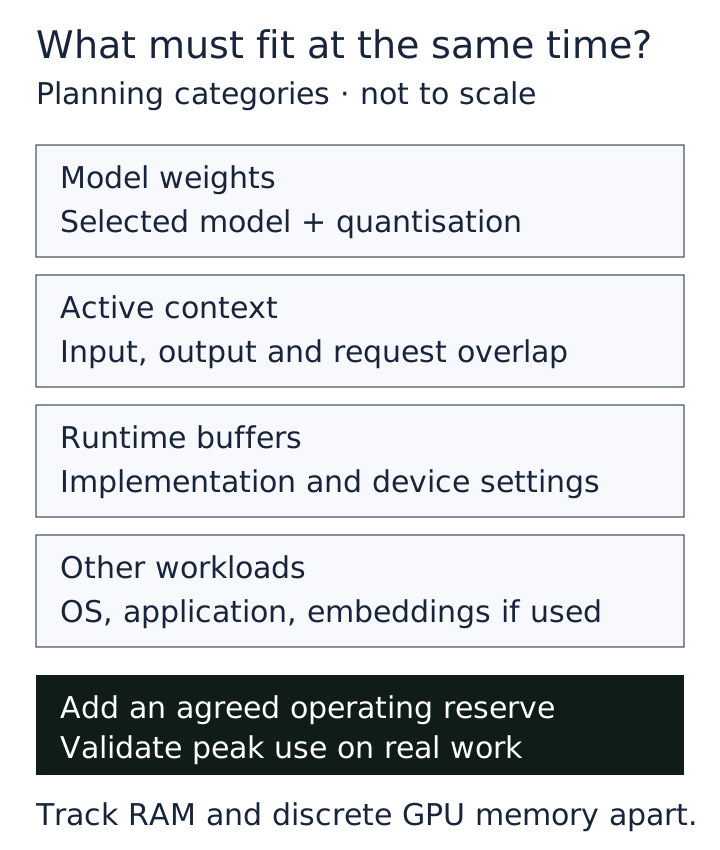
Keep host RAM and discrete accelerator memory in separate worksheet columns. For a shared-memory system, identify the common pool without counting it twice. Record measured peak use and the chosen reserve explicitly. The inspected Ollama FAQ and context page describe different defaults; set context explicitly rather than assuming a default applies to an unspecified build.
Can our existing computers meet the requirement before we buy anything?
Possibly, and a controlled trial can reveal both viable configurations and the reason a configuration fails.
Inventory processor, system RAM, accelerator, available accelerator memory, storage, operating system and drivers. Check the exact combination against the runtime's hardware support documentation. Supported hardware is an entry condition, not a response-time promise.
Ollama's FAQ documents CPU, GPU and mixed placement, with ollama ps reporting where a loaded model resides. A successful answer therefore does not prove the workload ran entirely on the accelerator. Record placement alongside timings so a slow run can be interpreted correctly.
Begin with a single request, then the intended overlap. If the machine remains a workstation, include normal desktop activity. An otherwise empty computer may pass a test that says little about a colleague trying to work while it serves the team.
Separate failures before spending. Exhausted memory may call for a different allocation or capacity. Waiting caused by a queue may call for fewer simultaneous jobs. Poor output may require a different model or scope. Slow document extraction is an application problem that a larger accelerator may not fix.
Include storage for approved model files, application data and recovery copies, plus sustained cooling and power needs in the eventual specification. Ask suppliers to demonstrate the agreed workload on the candidate configuration rather than substituting a generic benchmark.
When does a shared server make more sense than individual workstations?
Prefer a shared service when pooled demand and central maintenance suit the work; prefer separate machines when independent availability matters more.
A shared server gives the team one approved configuration to maintain and one capacity pool to manage. It also creates a common outage dependency. Individual workstations can isolate workloads, but introduce more configurations and may be unavailable when their owners restart or disconnect them.
For an initial trial, an existing machine is reasonable if its owner agrees to the load and recovery plan. Before promoting it to a team service, decide who maintains it, how named users authenticate and what happens when it sleeps. Localhost inference is not evidence that shared access or network controls work.
The proposed pilot should use read-only access to a dedicated folder of approved test inputs. Exclude production ERP connections and consequential actions. Give the technology lead ownership of configuration and recovery, and the workflow owner responsibility for output review. Retain logs and outputs only in agreed locations with a deletion date.
Local operation also needs a complete data-path assessment. Downloads, updates, external tools, telemetry and backups are separate destinations to inspect. A hardware trial does not establish privacy or offline behaviour. If offline use is required, add a blocked-outbound test for the entire application.
Which measurements should a hardware trial record besides tokens per second?
Record user waiting, completion, output quality, resource pressure and recovery under the intended arrival pattern.
The deliverable is a workload-to-memory sheet plus a timed replay. Freeze the runtime build, model hash, quantisation, context, output allowance and parallelism. Include cold starts, warm requests, ordinary arrivals and a deliberate overload burst. Retain raw request counts and timings, including failures and cancellations.
Measure client-side time to first useful output and end-to-end completion. Distinguish any intermediate reasoning display from the answer the user needs. Record queue delay where observable and report distributions rather than only the fastest run. Decide thresholds with the business owner before testing; none is presented here as a universal standard.
Ollama's generation API documents model-load, prompt-processing and generation timing fields. They help explain a run but do not replace client-side measurements. Network and queue waiting can affect the user before generated tokens appear.
For supported NVIDIA configurations, nvidia-smi documents memory, utilisation, temperature and power monitoring. Some fields depend on device support. GPU power reporting does not establish whole-machine electricity consumption. Use appropriate host-level measurement before making an operating-cost comparison.
Require acceptable reviewed outputs, no resource-exhaustion failures in the accepted workload and recovery after overload. Stop if the trial disrupts normal work or crosses its data boundary. Restore the saved configuration and normal workflow.
What should make us increase capacity, reduce scope or keep the workflow hosted?
Increase capacity when useful outputs pass review and measured resource pressure prevents the agreed service level.
The strongest case for buying a conservatively larger machine is an already-understood workload. Required model quality, context, overlap and growth allowance may justify avoiding repeated memory compromises. That is a practical inference from capacity constraints, not a measured saving in engineering time. Validate the proposed purchase with the same acceptance workload.
Reduce scope when shorter inputs, scheduled jobs or fewer simultaneous requests remain useful. Recheck quality after changing model, context or quantisation. More memory cannot compensate for a model that consistently misses the business requirement.
Keep an approved hosted workflow, or a manual process, when local candidates fail essential quality or timing requirements, or nobody can own the service. Hosted processing still needs approval for the information involved. Treat hardware cost alongside integration, power, maintenance, recovery and human review.
This proposed sizing exercise is not a customer result or an available hardware package. Purchase only after the selected configuration passes the agreed work and recovery tests.